
Features
Note Annotation for Clearer Screenshots
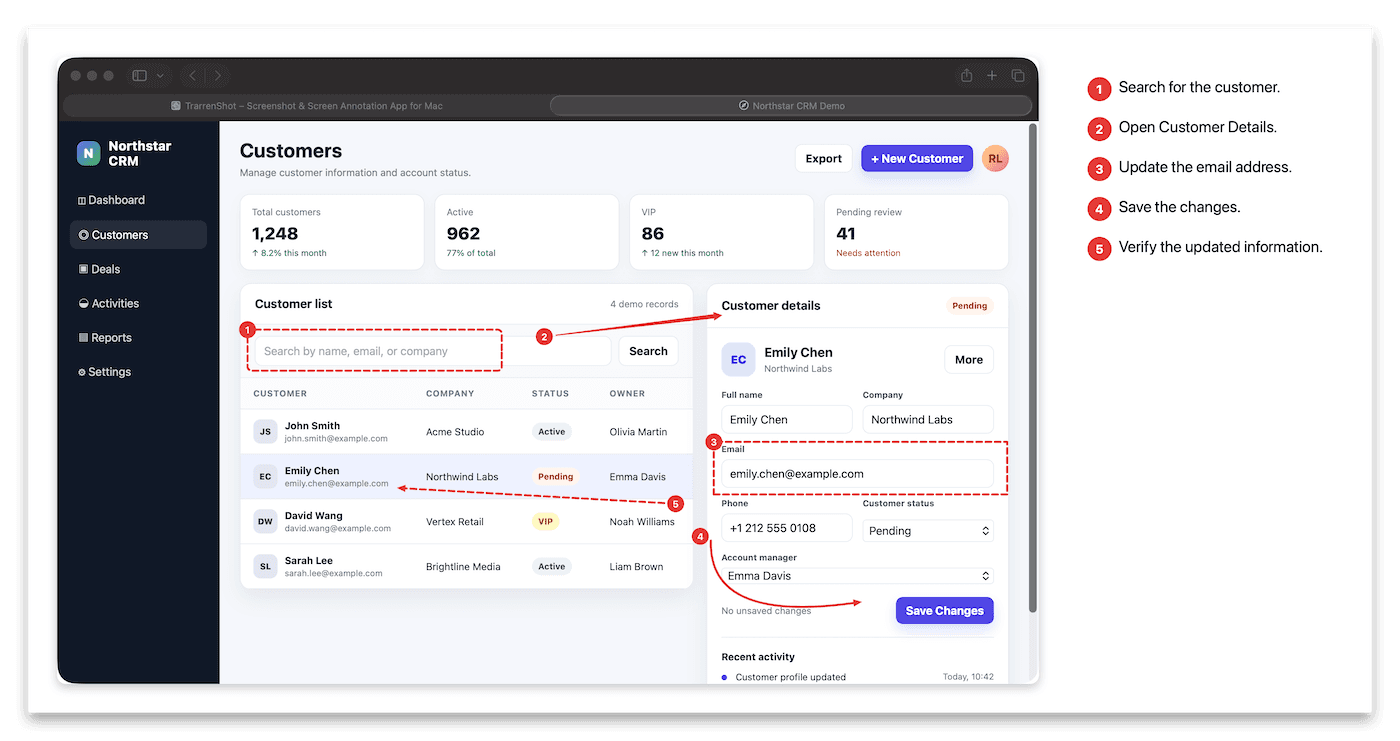
TrarrenShot Note Annotation lets you add numbered frames or arrows and write an explanation for each one in the One Shot editor. When you export a screenshot with notes, the result includes a numbered notes panel beside the capture.
Last updated: June 2026
Best for
- Explain specific UI details in a bug report or design review.
- Pair numbered callouts with instructions in a screenshot.
- Keep feedback points organized before exporting a visual explanation.
Point out what matters, add the context, and give every callout a number your audience can follow.
Keep visual explanations together
Choose Note in the Inline Editor, draw a frame or arrow around any part of a screenshot, and add a short explanation. The Note Overview keeps callouts organized before export.
When you export notes, TrarrenShot places a numbered notes panel beside the screenshot so the visual and its explanations stay together.
How it works
- Capture a window or region with One Shot and open it in the editor.
- Select Note, then draw a numbered frame or arrow toward the detail you want to explain.
- Add text, review the numbered list in Note Overview, and export when it is ready.
Before you start
- Note Annotation is available in the One Shot editor, not in Live Canvas.
- Notes change the exported image by adding a numbered panel beside the screenshot; longer notes can increase the output canvas size.
Frequently Asked Questions
- Can I add both callouts and text to a screenshot?
- Yes. Each Note annotation has a number, a frame or arrow, and supporting text that you can edit in the One Shot editor.
- What does the exported image look like when it includes notes?
- TrarrenShot places the annotated screenshot on a white canvas with a numbered notes panel beside it. The canvas can grow to fit the notes.
- Can I edit or remove a note before exporting?
- Yes. Note Overview lets you select, edit, or delete notes before you export the capture.
- Can I use Note Annotation in Live Canvas?
- No. Note Annotation is available in the One Shot editor and is not included in the Live Canvas toolbar.
Everything you need. Nothing you don't.
Learn moreOne Shot Capture on Mac
Start one capture and choose a window, a dragged region, or the full screen — then copy, save, or edit the result.
Learn moreScreenshot Annotation on Mac
Mark up screenshots on Mac with arrows, text, pen, highlighter, pixelate, magnify, and step tools in the TrarrenShot editor.
Learn moreA fast, lightweight Mac screenshot app with screen annotation, scrolling capture, OCR, and Live Canvas for meetings, demos, and remote work.