
기능
Mac용 One Shot 캡처
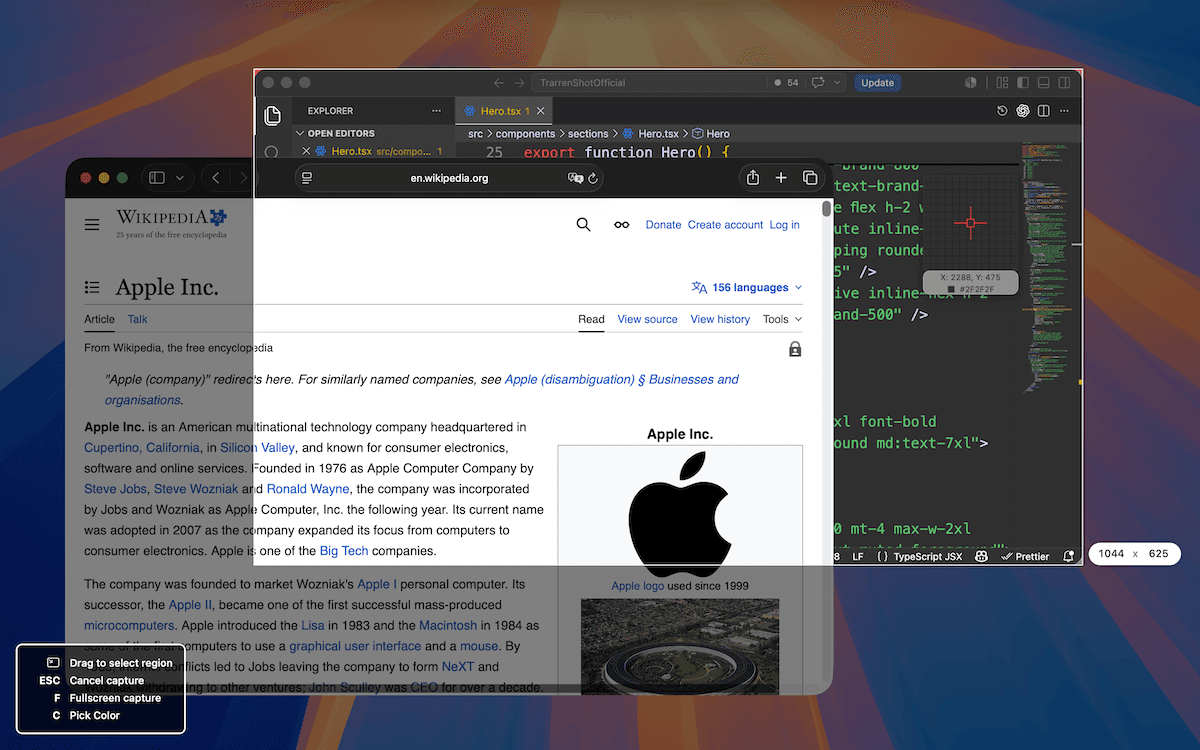
TrarrenShot One Shot은 창, 영역 및 전체 화면 캡처를 하나의 Mac 흐름으로 통합합니다. 다른 앱에 가려진 창을 선택하면 해당 캡처 이미지를 앞으로 표시한 뒤 인라인 편집기를 열어 최종 캡처 영역을 조정할 수 있습니다.
마지막 업데이트: 2026년 8월
이럴 때 적합합니다
- 별도의 캡처 모드를 고르지 않고 앱 창 하나를 캡처합니다.
- 문서, 웹 페이지 또는 앱의 보이는 부분을 선택합니다.
- One Shot을 시작할 때 포인터가 있던 디스플레이를 캡처합니다.
한 번의 동작으로 창, 영역 또는 전체 화면을 캡처한 다음 결과를 복사하고 저장하거나 편집합니다.
하나의 흐름으로 무엇이든 캡처
창 — 포인터를 창 위에 올려 강조한 다음 클릭해 캡처합니다. 영역 — 원하는 영역 위로 사각형을 드래그합니다. 전체 화면 — 현재 화면을 캡처합니다.
다음 동작 선택
출력 설정에 따라 결과를 편집기에서 열거나 클립보드에 복사하거나 파일로 저장합니다.
편집기를 선택하면 인라인 편집기에서 바로 주석을 추가하고 스크린샷을 다시 시작하지 않고 최종 캡처 영역을 조정할 수 있습니다.
한 흐름 안의 단축키와 편집
화면의 단축키 힌트에서 사용할 수 있는 동작을 확인할 수 있습니다. C를 누르면 포인터 아래의 HEX 색상을 복사하고, P를 누르면 Live Canvas를 열며, ESC를 누르면 취소합니다. 인라인 편집기에서 바로 주석을 추가하고 화면에 표시된 캡처 영역 수치를 직접 수정하여 최종 크기를 정밀하게 조정할 수 있습니다. 같은 캡처에서 QR 코드를 감지하거나 OCR 텍스트 인식을 사용할 수도 있습니다. 출력 뒤에는 미리보기에서 결과를 확인하거나 고정하고 다음 작업을 할 수 있습니다.
시작하기 전에
- One Shot은 보이는 창, 영역 또는 하나의 디스플레이만 캡처합니다. 화면 밖으로 이어지는 콘텐츠는 편집기 캡처 후 설정을 선택한 뒤 편집기에서 스크롤 캡처를 시작하세요.
- 캡처 후 결과는 선택한 설정에 따릅니다. 내보내기 전에 주석을 추가하려면 편집기 옵션을 선택하세요.
자주 묻는 질문
- One Shot으로 창, 영역 또는 전체 화면을 캡처할 수 있나요?
- 예. 같은 One Shot 흐름에서 강조된 창을 클릭하거나 영역을 드래그하거나 F를 눌러 해당 세션이 시작된 디스플레이를 캡처할 수 있습니다.
- 시작하기 전에 캡처 모드를 골라야 하나요?
- 아니요. One Shot은 같은 상호작용 흐름에서 창과 영역 선택을 지원하며 F로 해당 세션의 디스플레이를 캡처합니다.
- 캡처 후에는 어떻게 되나요?
- 선택한 캡처 후 설정에 따라 편집기, 클립보드 또는 파일로 진행합니다.
- One Shot으로 스크롤 스크린샷을 만들 수 있나요?
- 편집기 캡처 후 설정을 선택하고 One Shot으로 시작 영역을 캡처한 다음, 화면 밖까지 이어지는 내용은 편집기에서 스크롤 캡처를 시작하세요.
필요한 것은 모두. 불필요한 것은 없이.
더 알아보기Mac 스크린샷 주석
TrarrenShot 편집기에서 사각형, 원, 선, 화살표, 텍스트, 펜, 형광펜, 픽셀화, 확대, 단계 도구로 스크린샷을 표시합니다.
더 알아보기Mac OCR 텍스트 인식
One Shot으로 캡처한 화면에서 TrarrenShot 인라인 편집기로 텍스트를 추출하며 자동과 11개 선택 언어 모드를 지원합니다.
더 알아보기Mac QR 코드 감지
스크린샷에서 QR 코드를 찾고 편집기에서 내용을 미리 본 다음 지원되는 링크를 복사하거나 엽니다.
더 알아보기TrarrenShot은 화면 주석, 스크롤 캡처, OCR, Live Canvas를 지원하는 가벼운 Mac 스크린샷 앱으로 회의와 원격 작업에 적합합니다.