
Features
QR Code Detection on Mac
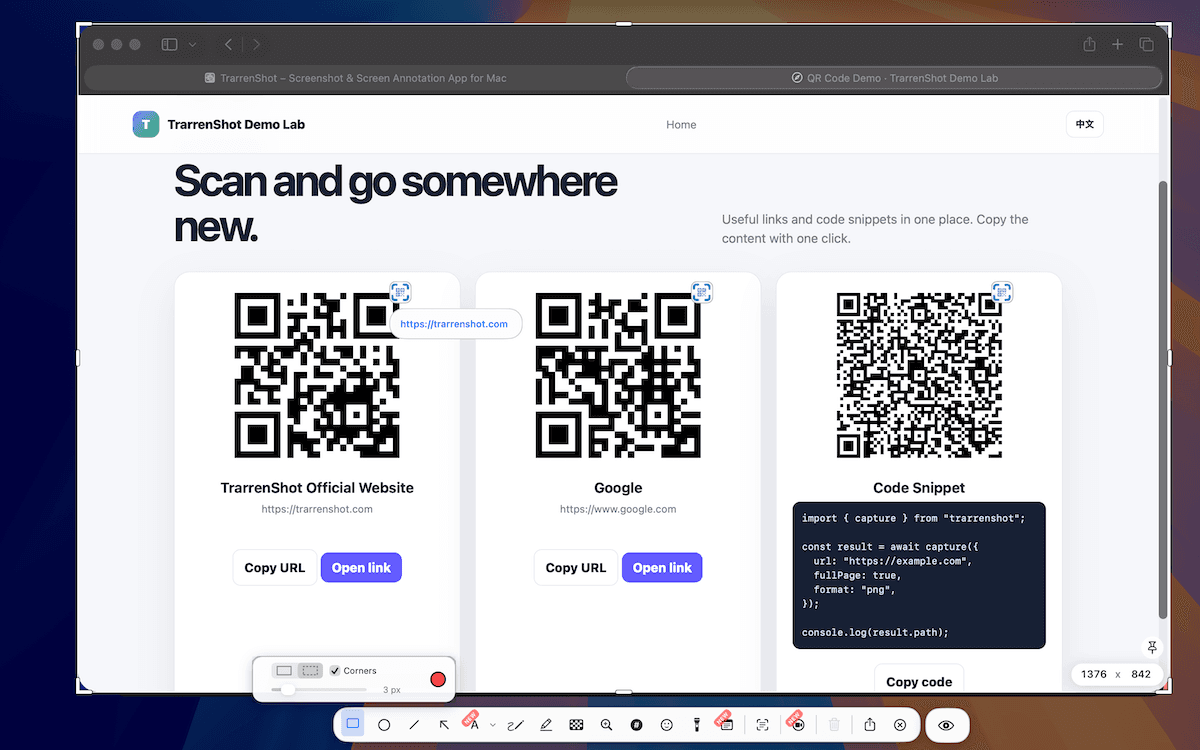
During the One Shot workflow, automatic QR detection can scan the captured screen or its current selection in the Inline Editor. You can view the decoded value, copy it, or open supported HTTP, HTTPS, and TrarrenShot links without launching a separate scanner.
Last updated: August 2026
Best for
- Read a QR code visible in a screenshot without switching to a separate scanner.
- Copy a decoded value into a browser, message, or document.
- Review several QR code values found in the same capture.
During One Shot, TrarrenShot can detect visible QR codes and place an action icon beside each result in the Inline Editor, so you do not need to launch a separate scanner.
For the practical capture-to-result steps, learn how to scan a QR code from a screenshot on Mac.
Read without leaving the editor
Preview the decoded payload, copy its value, or open a supported web link. When several QR codes are found, copy their payloads together in a labeled list. Hide the icons with the editor toggle or turn off automatic detection in General Settings.
How it works
- Capture a screen or region with One Shot and open it in the Inline Editor.
- Keep Auto Detect QR Codes enabled to scan the screenshot or current selection.
- Select a detected code to view its value, copy it, or open a supported link.
Before you start
- QR detection runs only when Auto Detect QR Codes is enabled in General Settings.
- Only HTTP, HTTPS, and TrarrenShot links can be opened directly; other decoded values can still be copied.
Frequently Asked Questions
- Can TrarrenShot read a QR code from a screenshot?
- Yes. With automatic QR detection enabled, the Inline Editor scans the screenshot or current selection and shows detected QR code values.
- Can I copy a decoded QR code value?
- Yes. Select the detected QR code and choose Copy Value. When several codes are found, you can also copy their payloads together as a labeled list.
- Which QR code links can TrarrenShot open?
- TrarrenShot can open decoded HTTP, HTTPS, and TrarrenShot links. Other QR payloads remain available to copy.
- Can I turn off QR code detection?
- Yes. Turn off Auto Detect QR Codes in General Settings to stop automatic detection in the Inline Editor.
Everything you need. Nothing you don't.
Learn moreOne Shot Capture on Mac
Start one capture and choose a window, a dragged region, or the full screen — then copy, save, or edit the result.
Learn moreScreenshot Annotation on Mac
Mark up screenshots on Mac with arrows, text, pen, highlighter, pixelate, magnify, and step tools in the TrarrenShot editor.
Learn moreA fast, lightweight Mac screenshot app with screen annotation, scrolling capture, OCR, and Live Canvas for meetings, demos, and remote work.