TrarrenShot logoTrarrenShot

OCR Text Recognition — Extract Text from Screenshots on macOS

Instantly extract and copy text from any screenshot, image, or screen region on macOS. TrarrenShot's built-in OCR supports multiple languages with high accuracy.

What is OCR Text Recognition?

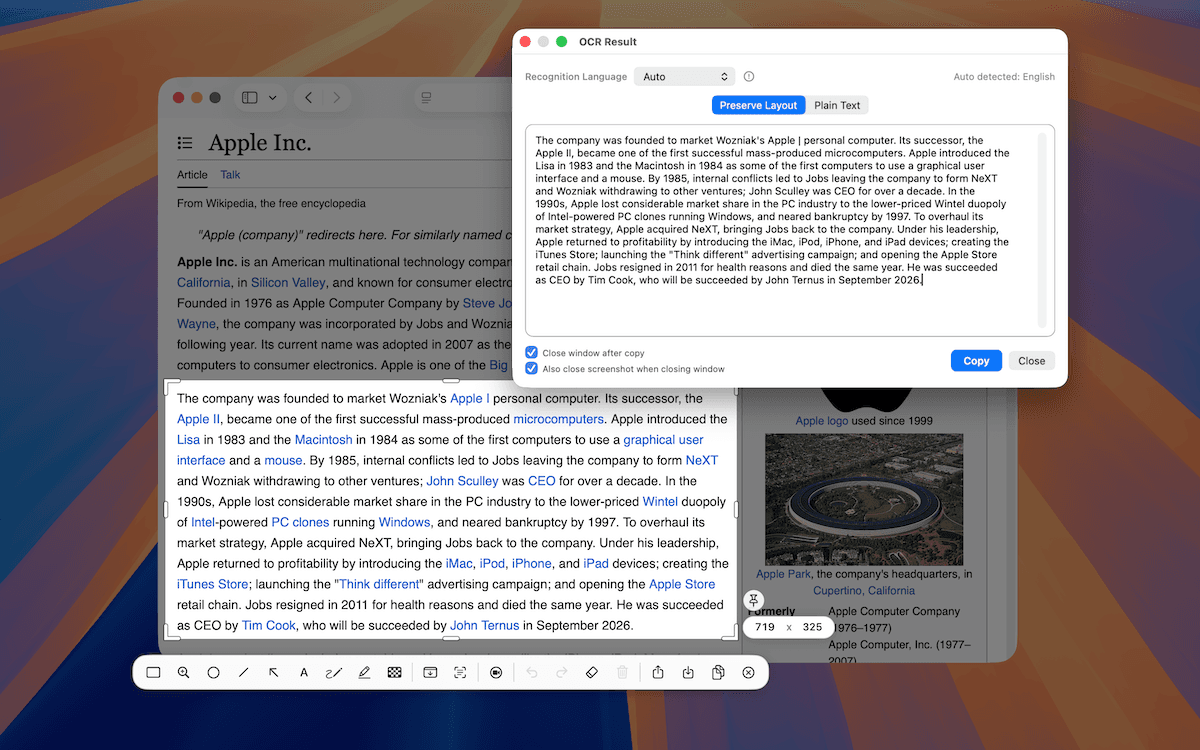
OCR (Optical Character Recognition) in TrarrenShot lets you extract and copy text from anything visible on your screen — screenshots, PDFs, photos, scanned documents, even video frames — instantly.

No more manually retyping text from images. Select any area on screen, and TrarrenShot converts the visual text to editable characters you can paste anywhere.

Why Use OCR in TrarrenShot?

  • Copy text from anywhere — extract text from locked PDFs, images, emails, and apps that don't allow text selection.
  • On-device privacy — recognition runs locally on your Mac using Apple's Vision framework. Nothing leaves your device.
  • Multiple languages — automatically detects and recognizes over 15 languages.

How It Works

1

Start OCR Capture

Press ⌃⇧T or select OCR Capture from the TrarrenShot menu bar icon.

2

Select the text area

Click and drag to select the area containing text you want to extract. TrarrenShot runs recognition immediately after selection.

3

Copy the recognized text

The OCR panel shows the extracted text. Click Copy All to copy everything, or select specific lines to copy only what you need.

For best OCR accuracy, ensure the text is clearly visible and not blurry. TrarrenShot performs best on text that is at least 12pt in size.

Supported Languages

TrarrenShot OCR automatically detects the language. Supported languages include:

  • English, Spanish, French, German, Italian, Portuguese
  • Chinese (Simplified & Traditional), Japanese, Korean
  • Russian, Arabic, and more via Apple Vision

Use Cases

ScenarioExample
Copy from locked PDFExtract text from a scanned contract
Screenshot translationGrab text to paste into a translation tool
Code from imagesCopy code shown in a tutorial screenshot
Address from photoExtract an address from a business card photo
OCR Text Recognition — Extract Text from Screenshots on macOS — TrarrenShot