
Features
OCR Text Recognition on Mac
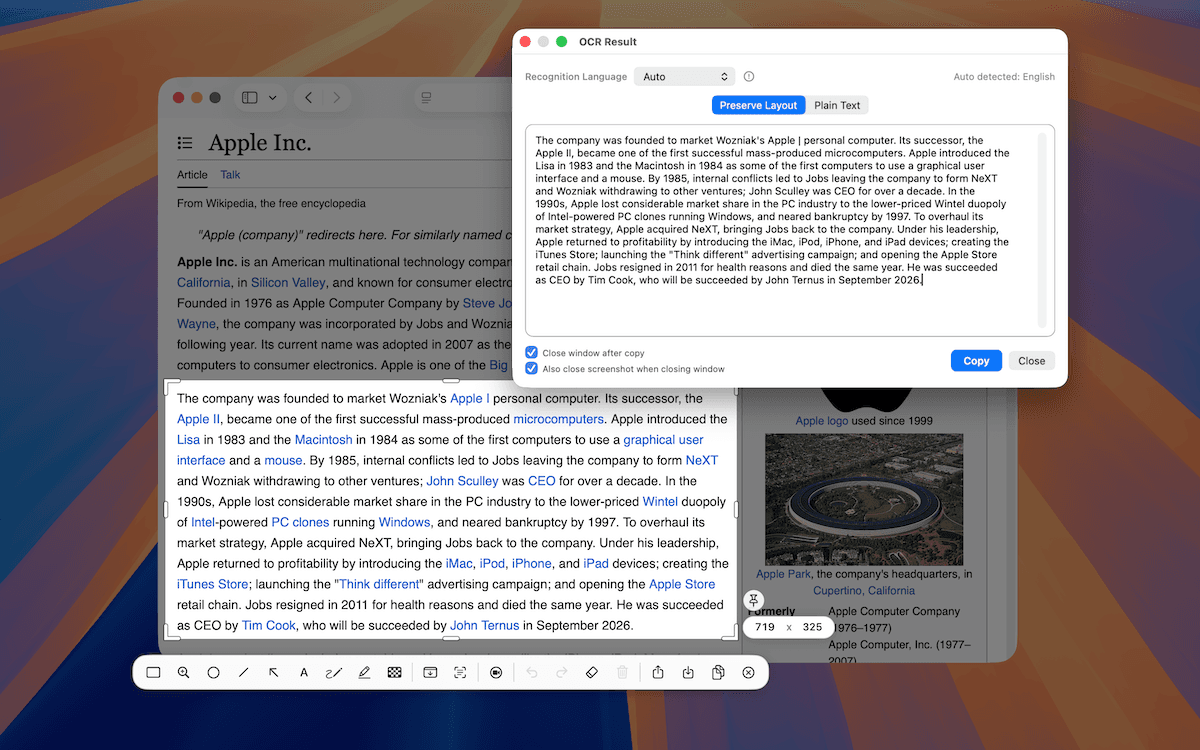
TrarrenShot OCR extracts text from the current One Shot capture in the Inline Editor. Choose Auto or one of 11 language modes, then review the result in a separate OCR window, correct or add text, and copy it.
Last updated: August 2026
How does TrarrenShot OCR work on Mac?
TrarrenShot OCR extracts text from the current One Shot capture in the Inline Editor and runs recognition locally on your Mac.
Best for
- Copy an error message or command shown in a screenshot.
- Turn text in an app, webpage, or document capture into editable text.
- Rerun recognition with a specific language mode when Auto is not the right fit.
OCR Text Recognition
Start with One Shot and capture the area that contains text. In the Inline Editor, choose OCR directly. Instead of sending recognition straight to the clipboard, TrarrenShot opens the recognized text in a separate OCR window where you can preview, correct, or add text before copying the final result. It supports Auto plus English, Traditional Chinese, Simplified Chinese, Japanese, Korean, German, Spanish, French, Italian, Portuguese, and Russian.
For an answer-first walkthrough that also covers macOS Live Text, learn how to extract text from a screenshot on Mac.
How It Works
Start One Shot
Start One Shot from the menu bar, or use the default shortcut if you have not changed it.
Select the area
Drag to select a region, or press F for a fullscreen capture.
Run OCR
Click the OCR tool in the Inline Editor.
Review and copy
Review, correct, or add text in the OCR window, then copy the final result.
Language modes: Auto, English, Traditional Chinese, Simplified Chinese, Japanese, Korean, German, Spanish, French, Italian, Portuguese, and Russian.
Privacy
Recognition, stitching, annotation, and export preparation run locally on your Mac.
Before you start
- OCR runs on the current One Shot capture; select the area that contains text before opening the Inline Editor.
- If no text is recognized, make the One Shot capture tighter or try another language mode.
Frequently Asked Questions
- Where is OCR in TrarrenShot?
- OCR is in the editor toolbar after a One Shot capture.
- Which languages can I choose?
- You can choose Auto, English, Traditional Chinese, Simplified Chinese, Japanese, Korean, German, Spanish, French, Italian, Portuguese, or Russian.
- Does OCR run on the One Shot capture?
- Yes. Capture the area that contains text with One Shot, then run OCR from the Inline Editor.
- Can I correct OCR text before copying it?
- Yes. OCR opens its recognized text in a separate window where you can correct or add text before copying the final result.
Everything you need. Nothing you don't.
Learn moreOne Shot Capture on Mac
Start one capture and choose a window, a dragged region, or the full screen — then copy, save, or edit the result.
Learn moreScreenshot Annotation on Mac
Annotate Mac screenshots in TrarrenShot's Inline Editor. Advanced Editor is coming soon for existing images, added screenshots, and multi-image compositions.
Learn moreQR Code Detection on Mac
Find QR codes in a screenshot, preview the decoded content, then copy or open supported links from the editor.
Learn moreA fast, lightweight Mac screenshot app with screen annotation, scrolling capture, OCR, and Live Canvas for meetings, demos, and remote work.