
Funktionen
OCR-Texterkennung auf dem Mac
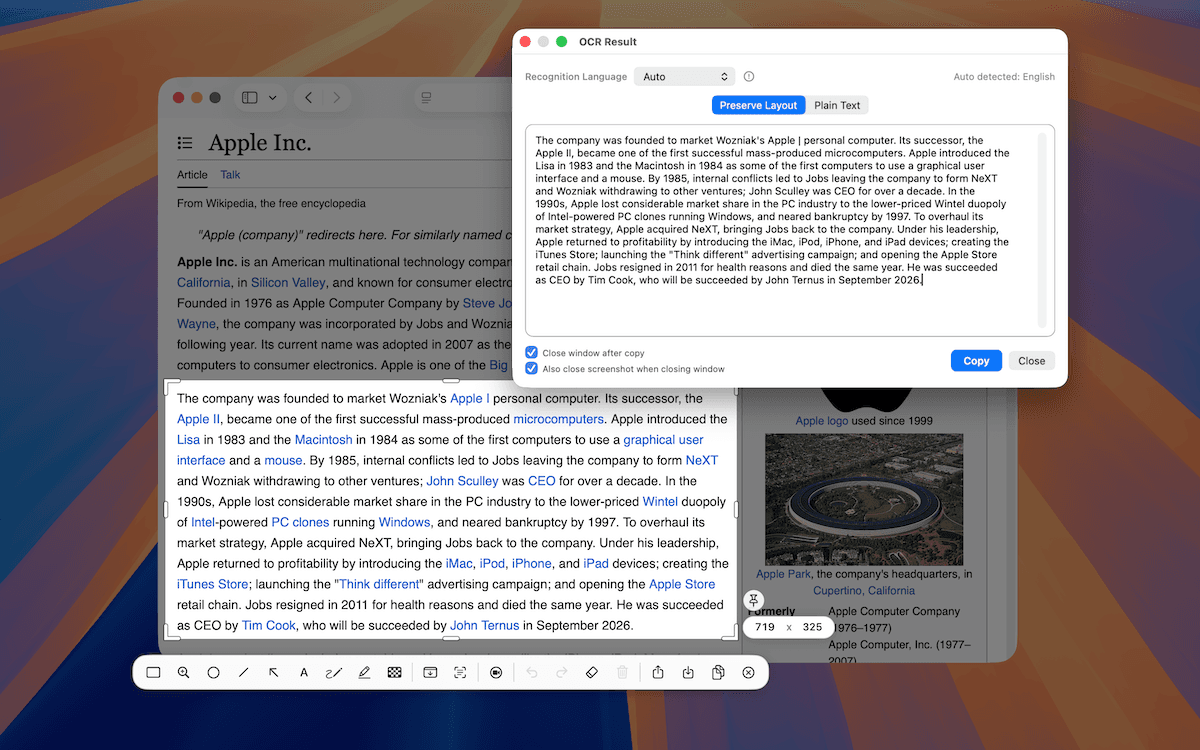
TrarrenShot OCR extrahiert Text aus der aktuellen One-Shot-Aufnahme. Wählen Sie Auto oder einen von 11 Sprachmodi, prüfen, korrigieren oder ergänzen Sie den Text im Ergebnis-Editor und kopieren Sie ihn anschließend.
Zuletzt aktualisiert: August 2026
Wie funktioniert TrarrenShot OCR auf dem Mac?
TrarrenShot OCR extrahiert Text aus der aktuellen One-Shot-Aufnahme im Inline-Editor und führt die Erkennung lokal auf Ihrem Mac aus.
Ideal für
- Eine Fehlermeldung oder einen Befehl aus einem Screenshot kopieren.
- Text aus einer App-, Webseiten- oder Dokumentaufnahme in bearbeitbaren Text umwandeln.
- Die Erkennung mit einem bestimmten Sprachmodus erneut ausführen, wenn Auto nicht passt.
OCR-Texterkennung
TrarrenShot OCR ist ein Werkzeug in der Editor-Werkzeugleiste, das Text aus der aktuellen One-Shot-Aufnahme auf dem Mac extrahiert. Es unterstützt Automatisch, Englisch, traditionelles Chinesisch, vereinfachtes Chinesisch, Japanisch, Koreanisch, Deutsch, Spanisch, Französisch, Italienisch, Portugiesisch und Russisch.
Funktionsweise
One Shot starten
Starten Sie One Shot über die Menüleiste oder verwenden Sie den Standardkurzbefehl, sofern Sie ihn nicht geändert haben.
Bereich auswählen
Ziehen Sie eine Region auf oder drücken Sie F für eine Vollbildaufnahme.
OCR ausführen
Klicken Sie im Inline-Editor direkt auf das OCR-Werkzeug.
Sprachmodi: Automatisch, Englisch, traditionelles Chinesisch, vereinfachtes Chinesisch, Japanisch, Koreanisch, Deutsch, Spanisch, Französisch, Italienisch, Portugiesisch und Russisch.
Datenschutz
Erkennung, Zusammensetzen, Anmerkungen und Exportvorbereitung laufen lokal auf Ihrem Mac.
Vor dem Kopieren prüfen
Starten Sie mit One Shot und erfassen Sie den Bereich mit Text. Führen Sie OCR im Inline-Editor direkt aus. Statt das Ergebnis sofort in die Zwischenablage zu senden, öffnet TrarrenShot den erkannten Text in einem separaten OCR-Fenster, damit Sie ihn prüfen, korrigieren oder ergänzen können, bevor Sie das Endergebnis kopieren.
Vor dem Start
- OCR läuft für die aktuelle One-Shot-Aufnahme; erfassen Sie den Bereich mit Text, bevor Sie den Inline-Editor öffnen.
- Wenn kein Text erkannt wird, erfassen Sie mit One Shot einen engeren Bereich oder probieren Sie einen anderen Sprachmodus.
Häufige Fragen
- Wo finde ich OCR in TrarrenShot?
- OCR befindet sich nach einer One Shot-Aufnahme in der Editor-Werkzeugleiste.
- Welche Sprachen kann ich wählen?
- Sie können Automatisch, Englisch, traditionelles Chinesisch, vereinfachtes Chinesisch, Japanisch, Koreanisch, Deutsch, Spanisch, Französisch, Italienisch, Portugiesisch oder Russisch wählen.
- Läuft OCR für eine One-Shot-Aufnahme?
- Ja. Erfassen Sie den Bereich mit Text mit One Shot und starten Sie OCR im Inline-Editor.
Alles, was du brauchst. Nichts, was du nicht brauchst.
Mehr erfahrenOne Shot Screenshot auf dem Mac
Mit einer Aktion ein Fenster, einen Bereich oder den gesamten Bildschirm erfassen und das Ergebnis kopieren, speichern oder bearbeiten.
Mehr erfahrenScreenshot-Anmerkungen auf dem Mac
Kommentieren Sie Mac-Screenshots mit dem Inline-Editor von TrarrenShot. Advanced Editor kommt demnächst für vorhandene Bilder, zusätzliche Screenshots und Bildkompositionen.
Mehr erfahrenQR-Code-Erkennung auf dem Mac
QR-Codes in einem Screenshot finden, den Inhalt im Editor prüfen und unterstützte Links kopieren oder öffnen.
Mehr erfahrenTrarrenShot ist eine leichte Screenshot-App für Mac mit Bildschirm-Annotation, Scroll-Aufnahme, OCR und Live Canvas für Präsentationen und Remote-Arbeit.