
Features
Customize Toolbar on Mac
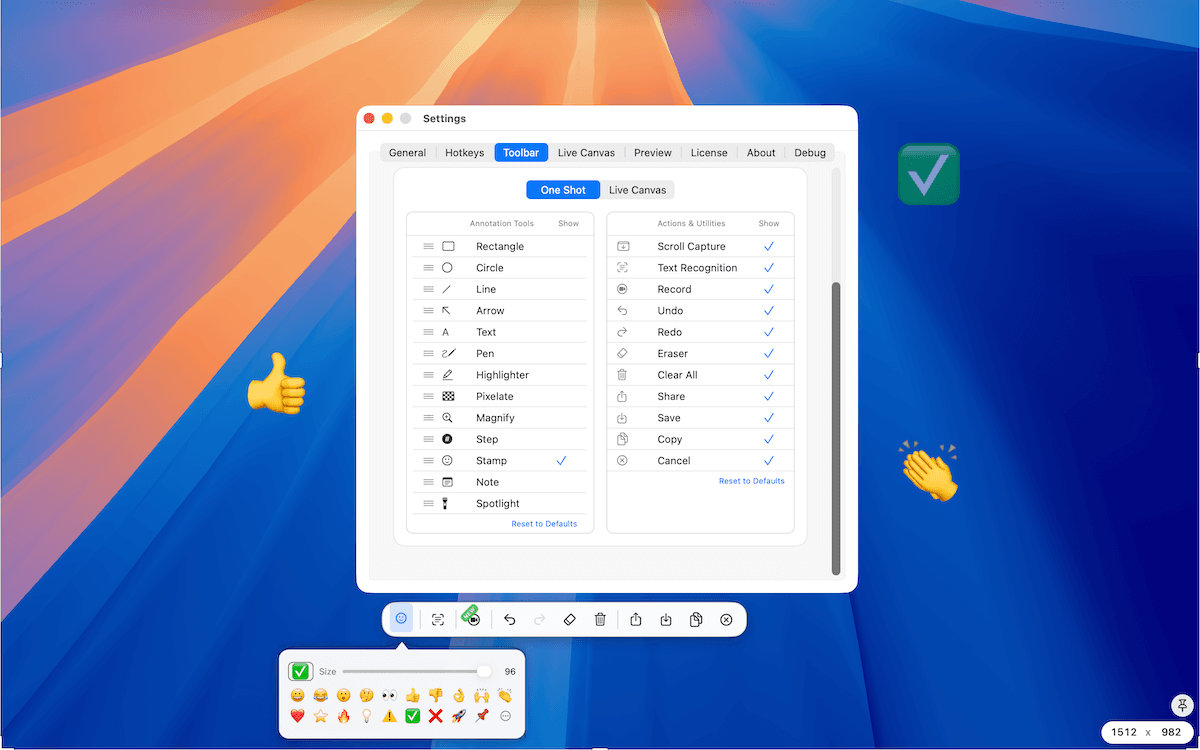
Customize Toolbar lets Plus users set separate One Shot and Live Canvas layouts. Reorder annotation tools, hide annotation tools, actions, or utilities you do not use, and reset each group to its default layout.
Last updated: June 2026
Best for
- Put the annotation tools you use most near the start of the toolbar.
- Hide output actions or utilities that do not belong in your workflow.
- Keep distinct toolbar layouts for One Shot and Live Canvas.
Customize Toolbar
Customize Toolbar helps Plus users keep TrarrenShot's editing controls focused. Set separate layouts for One Shot and Live Canvas, reorder annotation tools, hide items you do not use, and reset sections back to the default layout when needed.
How It Works
Open Toolbar settings
Open Settings, then go to the Toolbar section.
Choose a toolbar scope
Use Customize to choose One Shot or Live Canvas.
Reorder annotation tools
Drag annotation tools into the order you prefer.
Hide unused items
Toggle tools, actions, or utilities off when you do not want them in that toolbar.
Reset when needed
Use the reset controls to return annotation tools or action and utility visibility to the default layout.
Customize Toolbar is available with Plus.
See Pricing for the current Basic and Plus details.
Before you start
- Customize Toolbar is available with TrarrenShot Plus.
- Only annotation tools can be reordered; actions and utilities can be shown or hidden.
- Customization has separate One Shot and Live Canvas scopes.
Frequently Asked Questions
- Can I customize One Shot and Live Canvas separately?
- Yes. Customize Toolbar has separate One Shot and Live Canvas scopes.
- Can I reorder toolbar items?
- You can reorder annotation tools. Supported toolbar actions and utilities can be shown or hidden.
- Is Customize Toolbar included for free users?
- Customize Toolbar is available with Plus.
- Do number shortcuts follow my custom order?
- Yes. Visible annotation tool shortcuts follow the current visible order.
Everything you need. Nothing you don't.
Learn moreOne Shot Capture on Mac
Start one capture and choose a window, a dragged region, or the full screen — then copy, save, or edit the result.
Learn moreScreen Annotation for Mac | TrarrenShot Live Canvas
Draw directly on your Mac screen with Live Canvas. Annotate during meetings and demos, click through to your apps, then save, copy, or share.
Learn moreScreenshot Annotation on Mac
Mark up screenshots on Mac with arrows, text, pen, highlighter, pixelate, magnify, and step tools in the TrarrenShot editor.
Learn moreA fast, lightweight Mac screenshot app with screen annotation, scrolling capture, OCR, and Live Canvas for meetings, demos, and remote work.